
Noble Fates Mods: Best Workshop Picks and Setup
The best Noble Fates Workshop mods for UI, performance, kingdom size, races and content, with subscription counts and install notes for 1.0.
Start with three: Stig's UI for a searchable build menu, Stig's Performance for late-game lag, and 10x Stack Size for storage sanity. Add Very Large Kingdom Size if you want more than 16 nobles, Fantasy Races or Lizardmen if you want new cultures, and Alchemy if you want a new production chain. Install mods before a new kingdom when possible.
Noble Fates has a real Workshop scene, and the mod quality is unusually high for a small studio's game. The best mods do not add flashy content; they fix the friction that stops you from playing.
How mods work here
- Subscribe on the Steam Workshop.
- Enable mods when you set up a kingdom. Mod lists are tied to saves.
- Some mods are safe to add or remove mid-save; many are not. Each mod page says which.
- Mods that change rules may affect achievements, which were added in 1.0 and cached offline.
Rule of thumb: UI and performance mods are safe, content mods want a fresh save, race and principle mods want a fresh save.
Tier 1: quality of life
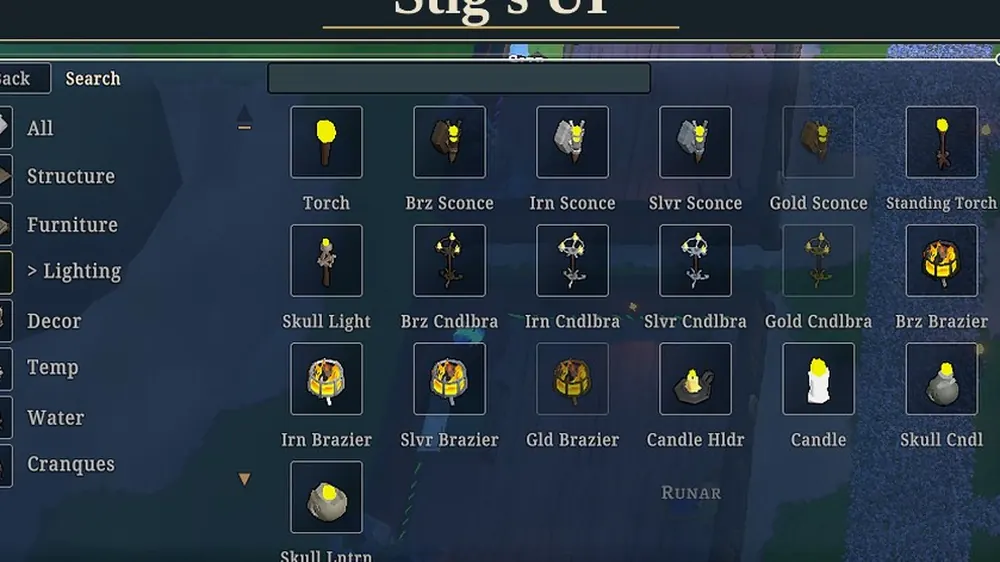
Stig's UI (3830603778)
The single best mod for a new player. It adds:
- A new build menu with search and categories.
- Hiding badges.
- An enhanced Jobs UI.
- Enhanced stock view with filters and search.
- Faster, cleaner menus and settings.
- An in-game Workshop browser.
- A "back to main menu" option from inside a save.
If you install one mod, install this one. Mid-game installable.
Stig's Performance (3830603648)
Targets the 10x speed lag that appears in the late game.
- Reduces the frequency of planning, plant, building, item, weather, vision and physics updates at 10x.
- Applies missed time when the system next wakes, so the clock still counts.
- Faster save loading.
Installable and uninstallable mid-game, but back up your save first.
10x Stack Size (2783530889)
Stack sizes multiplied by ten. This is the difference between a readable stockpile and a warehouse full of single-item piles.
Patchwork (3435247037)
A bundle of thirteen small mods, including 10x Stacks, Attribute Cap, Custom Settings, Faster Trees, Fire Not Required, Max Skill, Mine More, More Seeds, More Berries, More Stone and More Wood.
Use Patchwork instead of installing those individually. Do not install both.
Max Skills (3059137298)
Cheaty, and honest about it. It raises the starting skill points you can assign to nobles and adds a Creative preset. Great for testing builds, bad for a first honest campaign.
Tier 2: kingdom scale
Very Large Kingdom Size (3448066786)
The one mod that changes the game's ceiling.
- Adds a chain of Very Large Kingdom beliefs.
- Allows up to 100 mortals in the current version.
- Tiers matter: at 29 mortals you need the second Very Large belief.
- Babies count toward the total; mercenaries and prisoners do not.
- Compatible with 1.0 and old saves, per the author.
Read the mod notes before installing, because the belief tier logic is not obvious. The kingdom size guide→ explains the vanilla tiers.
Construction+ [WIP] (3471242761)
Adds themed building sets. Currently Ironworks (industrial chaos) and Dryad (wood elf). More sets planned. Still work in progress, so expect gaps.
Tier 3: races and principles
| Mod | ID | What it adds |
|---|---|---|
| Lizardmen V2.0 | 3325757775 | Full lizardman race with models, voices and principles |
| Fantasy Races | 3706374262 | Demons, Goblins, Trolls, Kobolds, Kreens, Wood Elves |
| No Humans | 3537743727 | Removes humans from world generation |
| Kobold principles | 3289995050 | Adds kobold principles to kingdoms |
| High elf principles | 3290029619 | Adds high elf principles |
| Lizardmen principles (V2) | 3325907239 | Adds V2 lizardmen principles |
These are culture mods, not cosmetic packs. They add principles that both you and AI kingdoms can adopt, which changes diplomacy. The principles guide→ explains why that matters.
No Humans requires a new save and may break an existing one.
Tier 4: content and challenge
| Mod | ID | What it adds |
|---|---|---|
| Alchemy | 2786669536 | Alchemy skill, gems, potions, herbs, new rooms |
| Monster Madness 2 | 2964580928 | Hellhound, Imp Champion, Werewolf, Wyvern invasions |
| Rise of Baku | 2977083454 | New demigod, monsters, missions and moments |
| Ancient Sentinels | 3065629441 | Robot guards bought from traders, no food cost |
| Karma Loot | 2791174638 | Random loot stashes in the wild (needs Abandoned Supplies) |
Alchemy is the standout. It adds a full production chain: five crystal colours, five gem tiers, gem slots, accessories, potions and new crops. It is a large mod and it wants a fresh save.
Karma Loot is no longer maintained. It works, but expect no fixes.
Tier 5: decoration
Dragon Set (2976396513), Church Window Collection (2836737520), Halloween Deco (2890257758), KGarden (2799101035), TablePlants+ (2795360674), DIY Bedrolls (2783471431), Head Stake (2877742666), Spartan Set (2962293202).
Decoration mods are the safest category. They add props that raise quality and prestige, which feeds worship and mood. Pair them with the building guide→.
A recommended mod list for a first modded run
- Stig's UI
- Stig's Performance
- 10x Stack Size (or Patchwork, not both)
- Very Large Kingdom Size
- One race mod if you want a different culture
- Dragon Set or KGarden for decoration
That is enough to change the experience without turning the game into a different one.
Common mod mistakes
- Installing race mods mid-save. Fresh save, always.
- Running Patchwork and its components together. Double mods, double bugs.
- Adding a big content mod to a mature save. Alchemy and Baku want a new kingdom.
- Ignoring mod tags. Check that a mod lists v1.0 support.
- Assuming achievements are safe. Rule-changing mods may block them.
Sources
Official source: Noble Fates on Steam ↗
- Steam Workshop ↗ for all listed mods and their current pages.
- 1.0 patch notes ↗ for the vanilla systems these mods extend.
- Steam store page ↗ for the base game feature set.
FAQ
Do mods disable achievements?
Possibly. Achievements were added in 1.0 and are cached offline. Cosmetic and UI mods are the safest; rule-changing mods may affect eligibility.
Can I add mods to an existing save?
UI and performance mods usually yes. Race, principle and large content mods usually want a new save. Read the mod page.
Is Very Large Kingdom Size compatible with 1.0?
Yes, per the mod author, including old saves. Keep a backup anyway.
Where do mods install?
Through Steam Workshop subscriptions. Stig's UI adds an in-game Workshop browser, which is the easiest way to manage them.